Black Friday 50% off for 24 months on all plans with BF50 until 30 Nov 2026, 11:59 pm (CET). Offer for businesses, prices net of VAT. Terms

Client Approval Portal


CLAPPO brings files, versions, feedback and approvals together in one place – for agencies, photographers, studios, freelancers and their clients.

Hetzner – ISO/IEC 27001:2022 certifiedSource: Hetzner Online GmbH
One system for the entire approval processScroll down
01 / The principle

Upload → Review → Comment →
Compare → Approve → Done

A clear path through every approval process.

02 / The status quo

Email. Teams. WhatsApp. PPTs. PDFs.
And somewhere in between, the approval.

The creative process is strong. The coordination in between often is not. Feedback is scattered across channels, versions get mixed up, and in the end nobody is sure what has actually been approved.

01Files are sent back and forth
02Feedback arrives through different channels
03Versions get mixed up
04Approvals are unclear
The clear answerCLAPPO brings it all together.
03 / The workflow

From the first upload
to the final approval.

One workflow. One system.
One clear version.

01→
Upload

Everything in one place.

02→
Review

Feedback right on the content.

03→
Comment

Clear and in context.

04→
Compare

Understand versions with confidence.

05→
Approve

One click that counts.

06
Done

Documented.

04 / Projects

One project.
All the information.

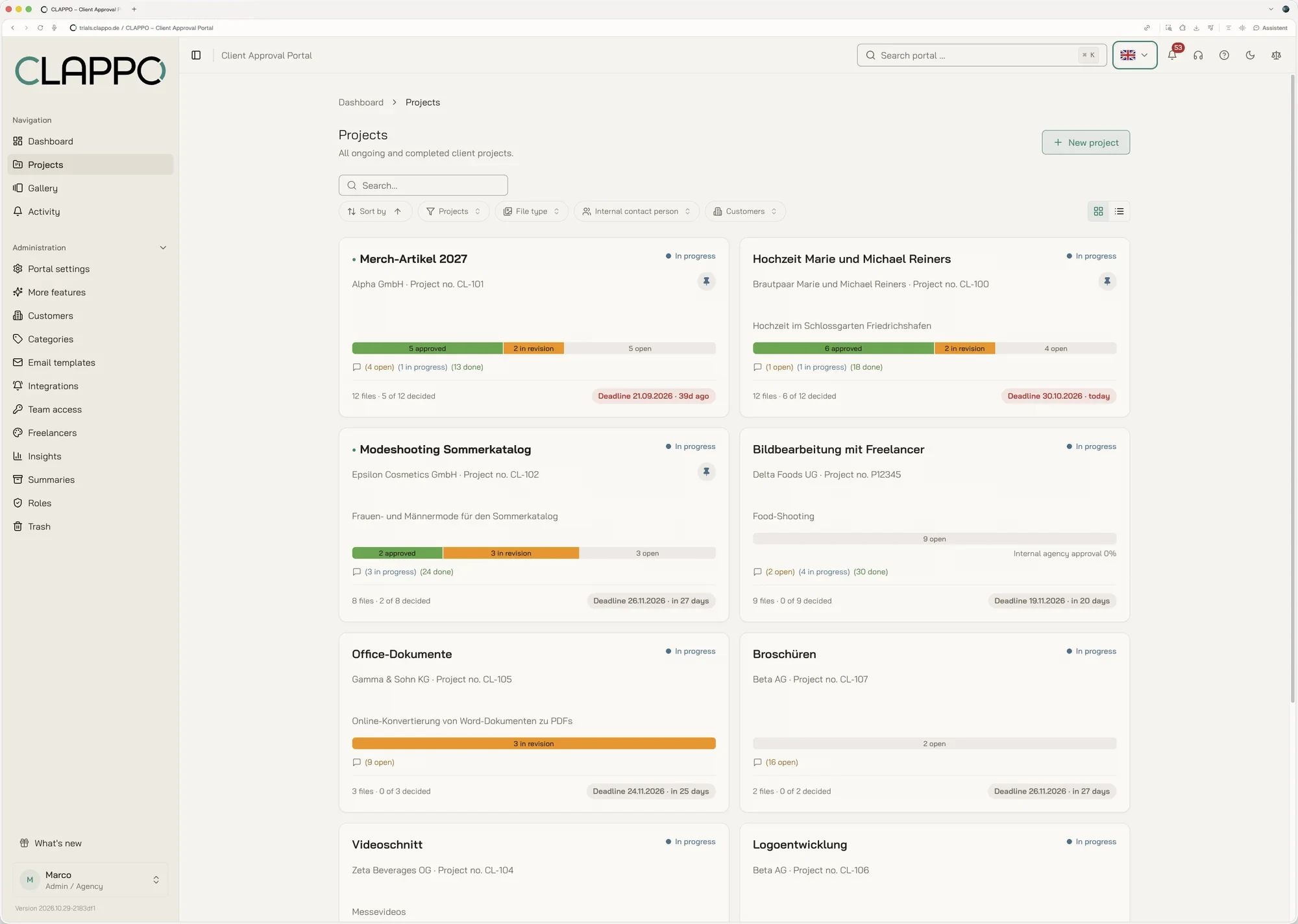
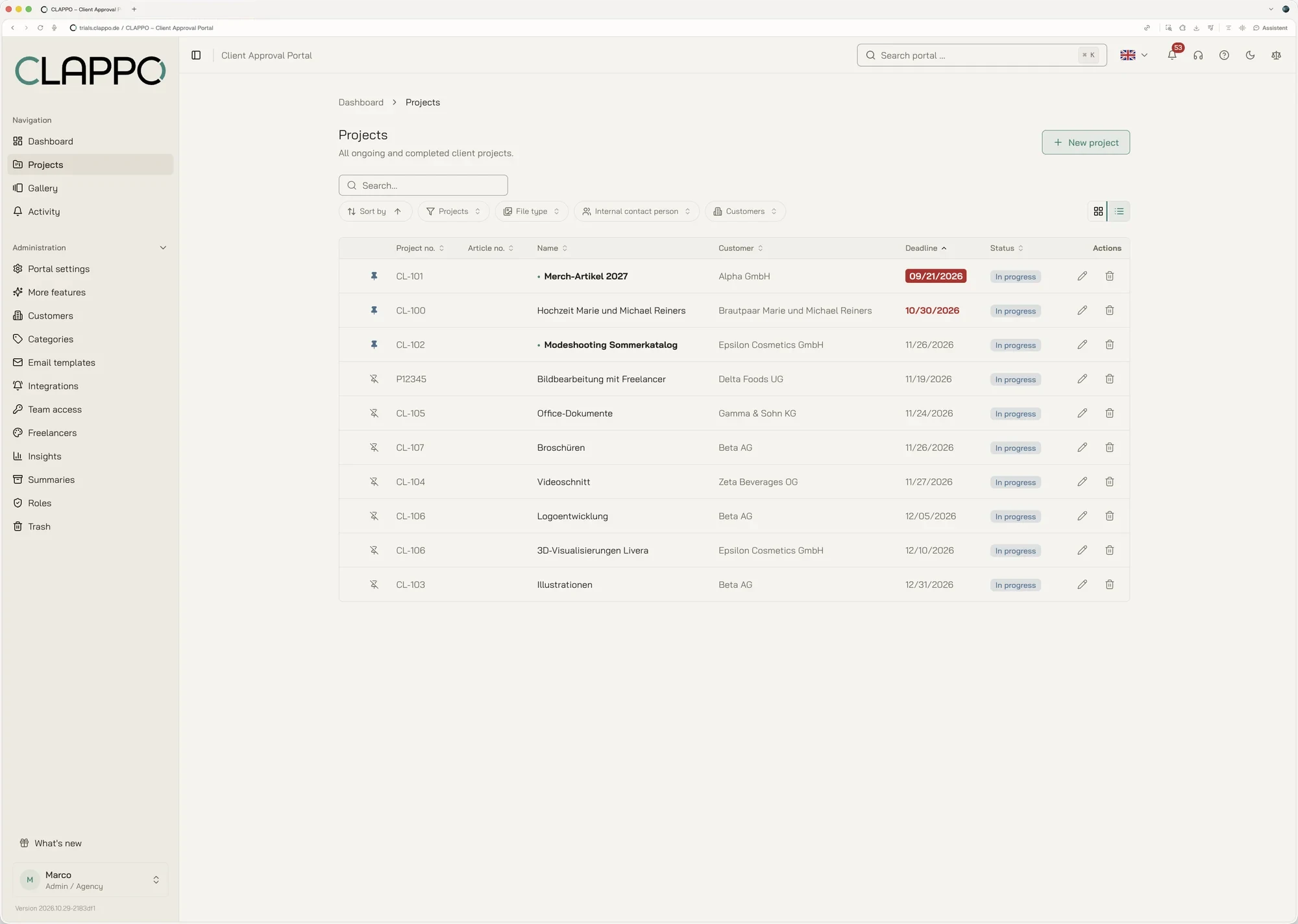
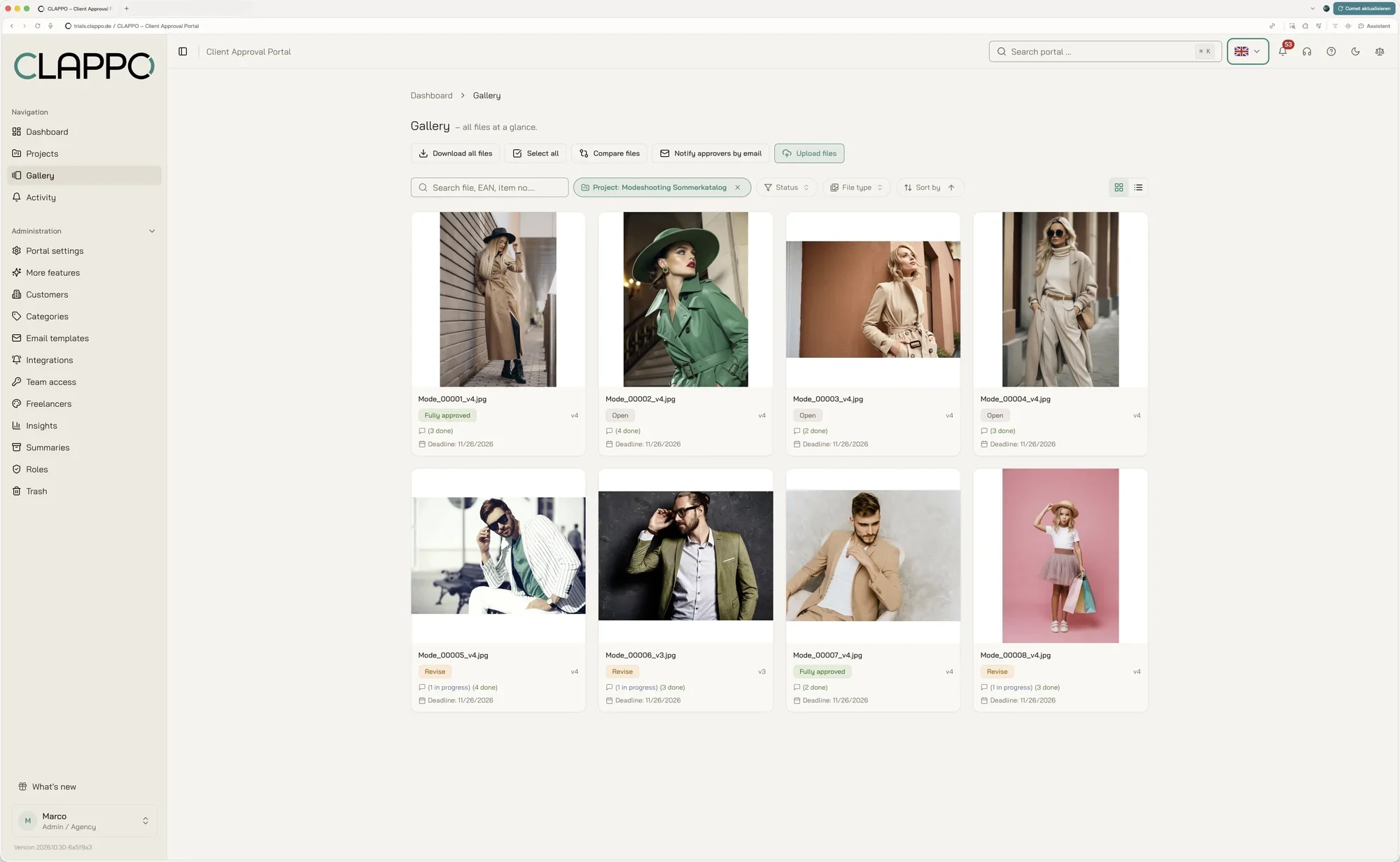
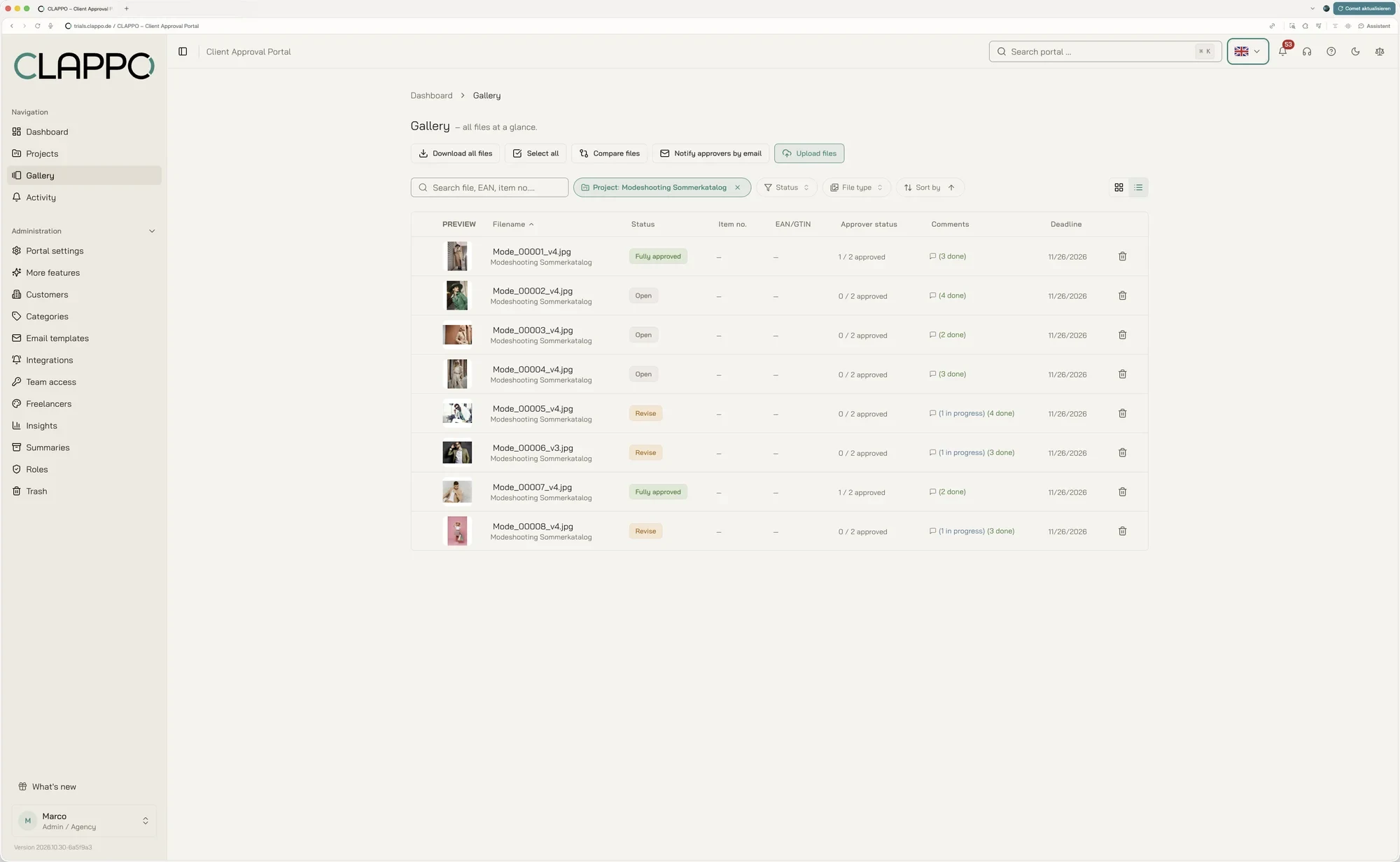
Projects become a shared space for your team, clients and approvals – as tiles or as a compact list.

Project overview in tile view with preview images, approval progress and deadline per project
Hover over the image to switch the view
Project view
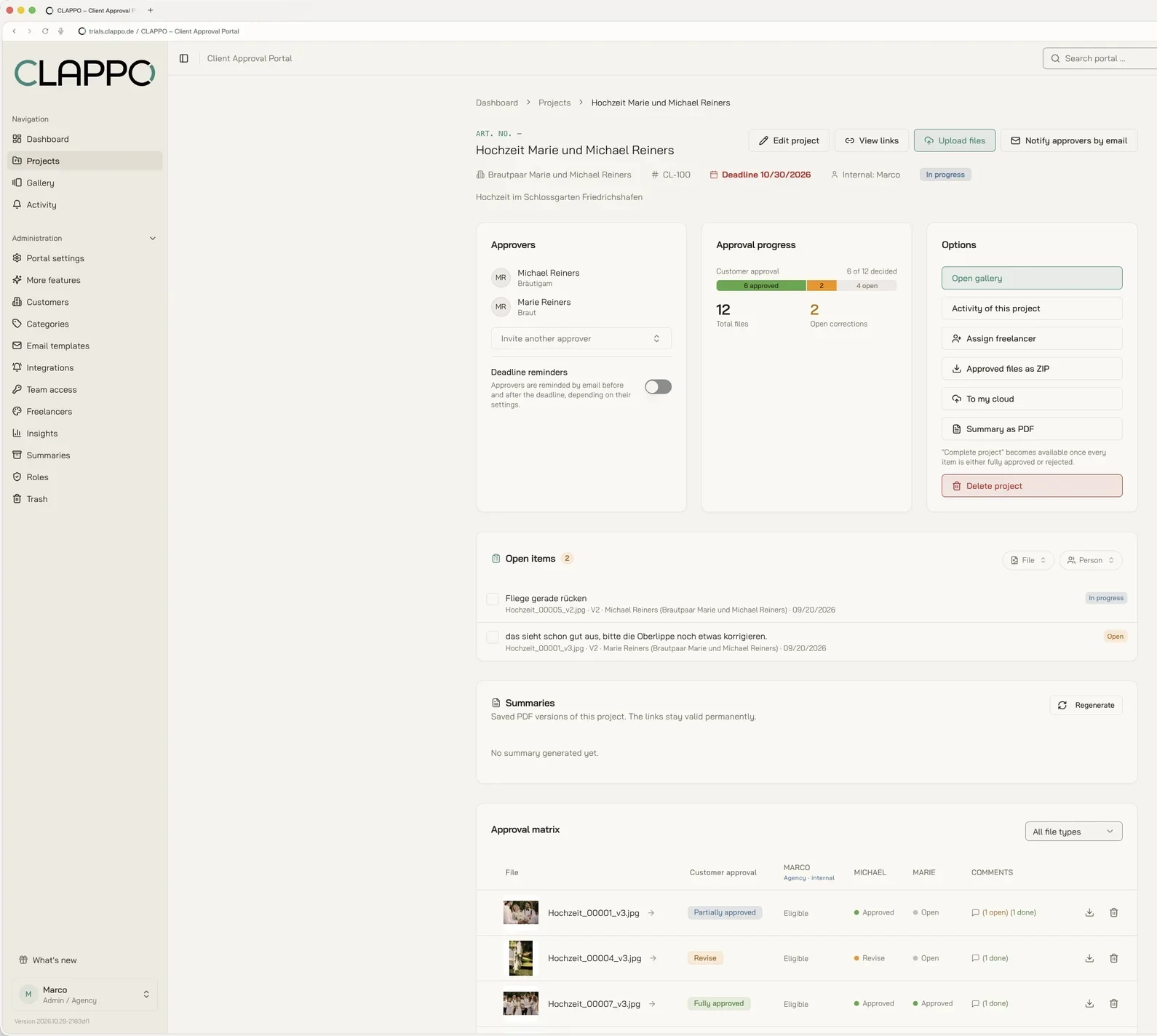
Everything that matters.

Client, deadline, approvers, freelancers, approval progress and the approval matrix of all files – visible before the next question comes up.

Project view with approvers, approval progress, summaries and approval matrix
05 / Comments

Feedback right
on the visual.

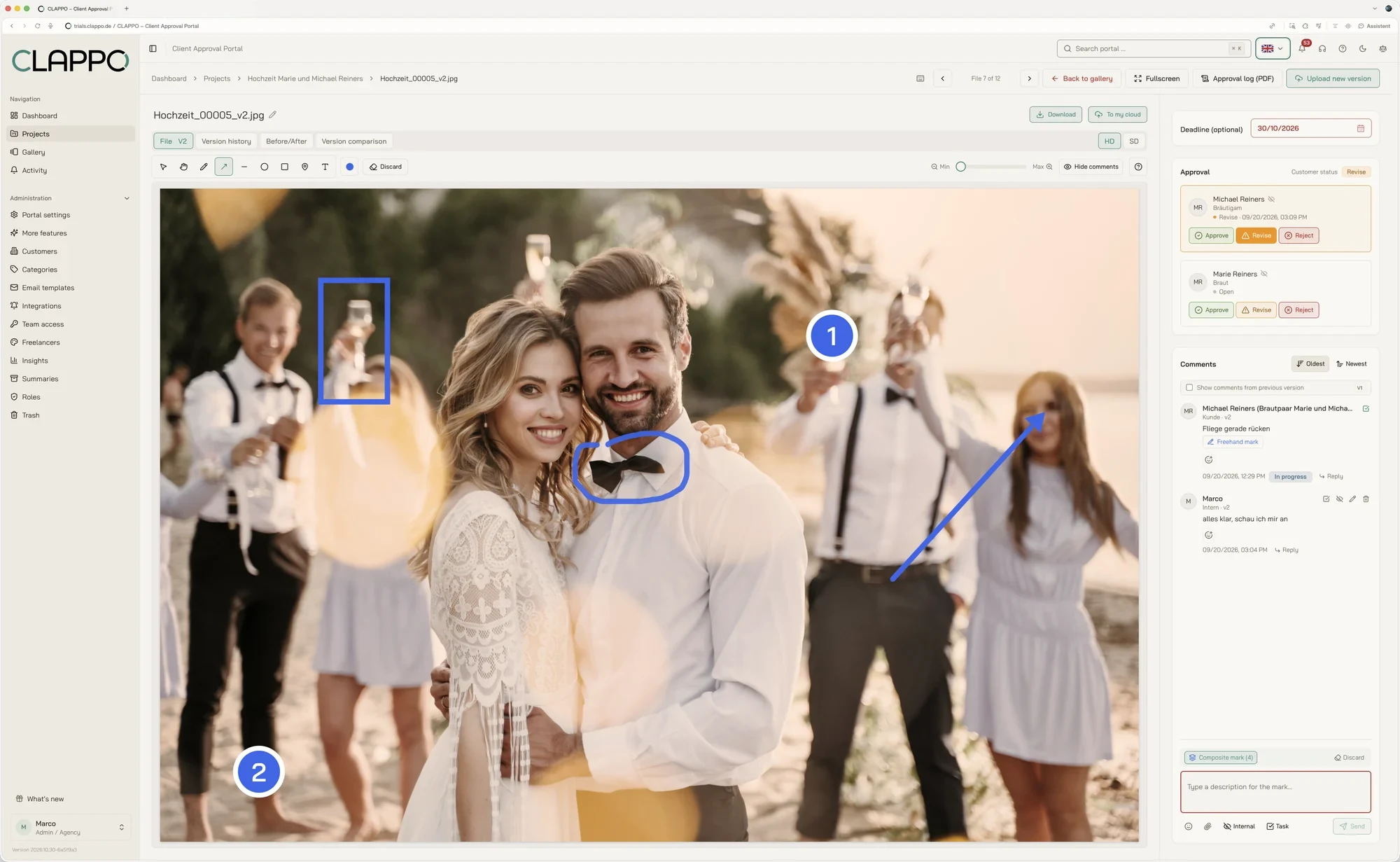
Pinpoint comments instead of long explanations. Every note stays in the right context – on images, videos, PDFs and Office documents.

Arrows, circles, rectangles, freehand and text Replies, @-mentions and internal notes Comments become tasks with a status
Image view with markups right on the visual, approval status and comment column
06 / Version comparison

Compare versions.
Don't guess.

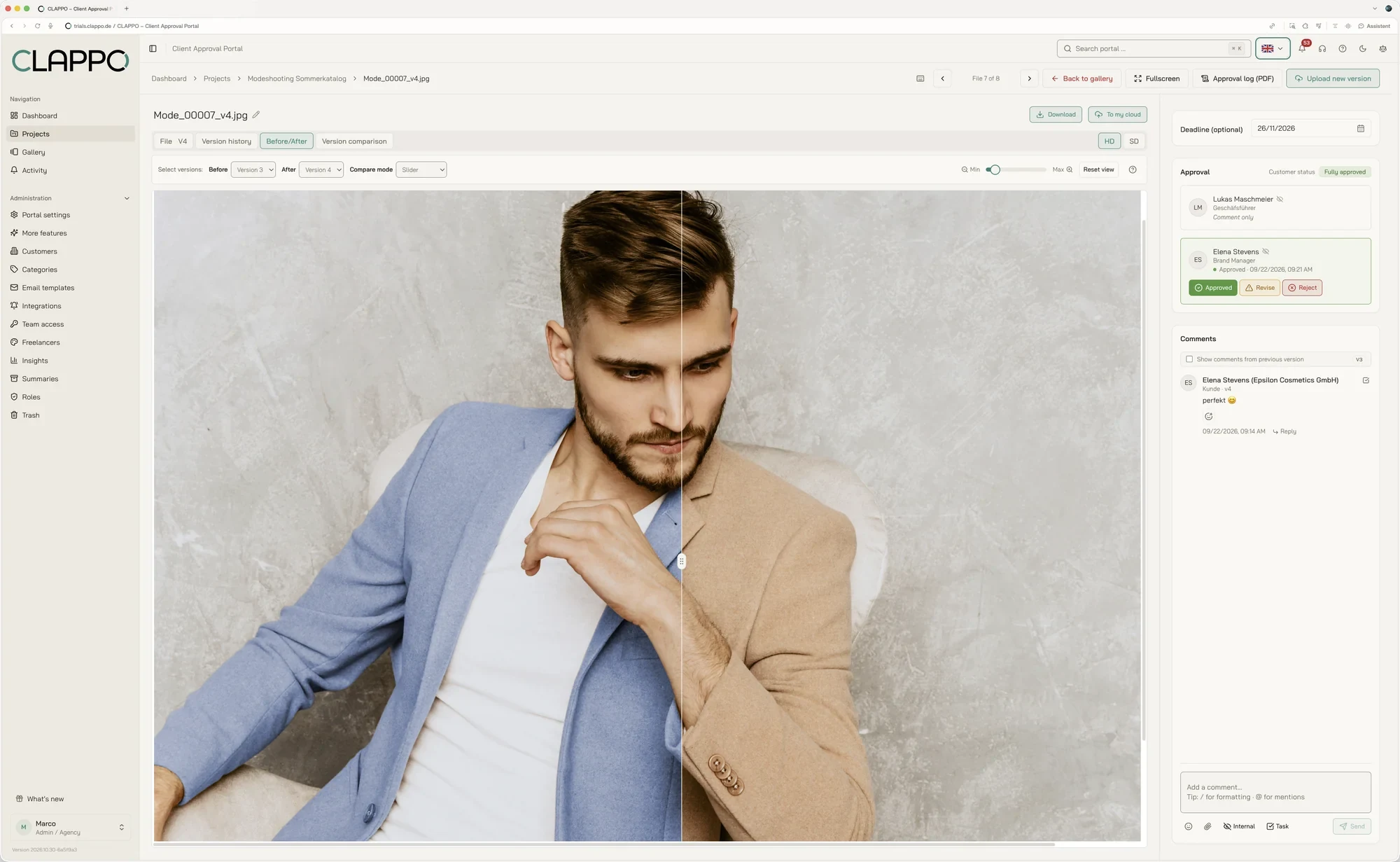
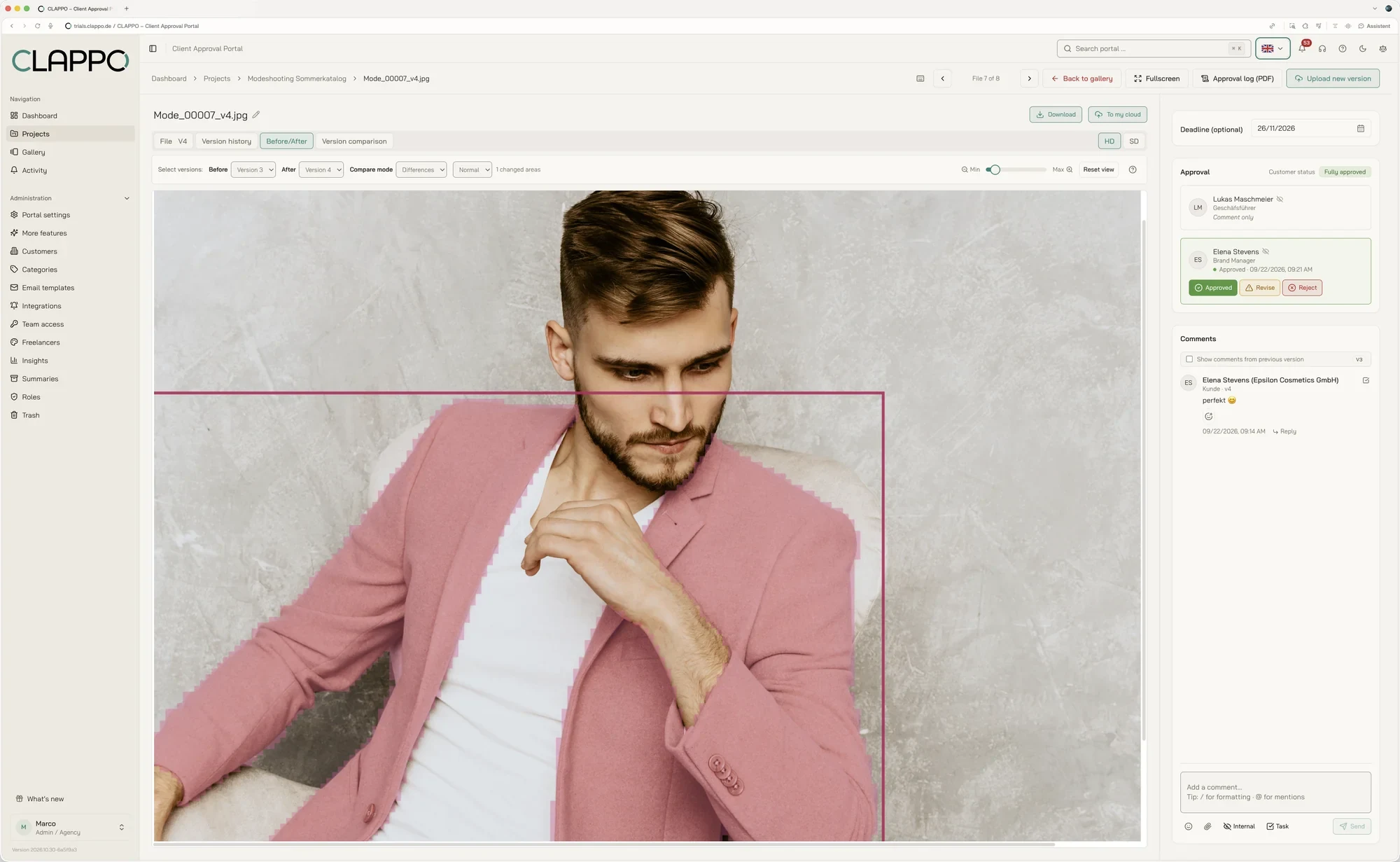
Before/after comparison with a slider, blend, blink and automatically highlighted differences, for PDFs also as a text comparison – you decide which versions to compare with each other.

Before/After tab with the slider mode: on the left version 3 with a blue jacket, on the right the new version with a beige jacket, the divider in between
Hover over the image to switch the view

Slider: the old and the new version lie on top of each other. Drag the divider and see exactly what has changed. You choose which versions to compare, for example V1 with V3.

SliderBefore and after on top of each other
Blend & blinkSmall changes stand out at once
DifferencesChanged areas highlighted automatically
TextEvery changed word in PDFs
07 / Multi-comparison

Several versions.
One glance.

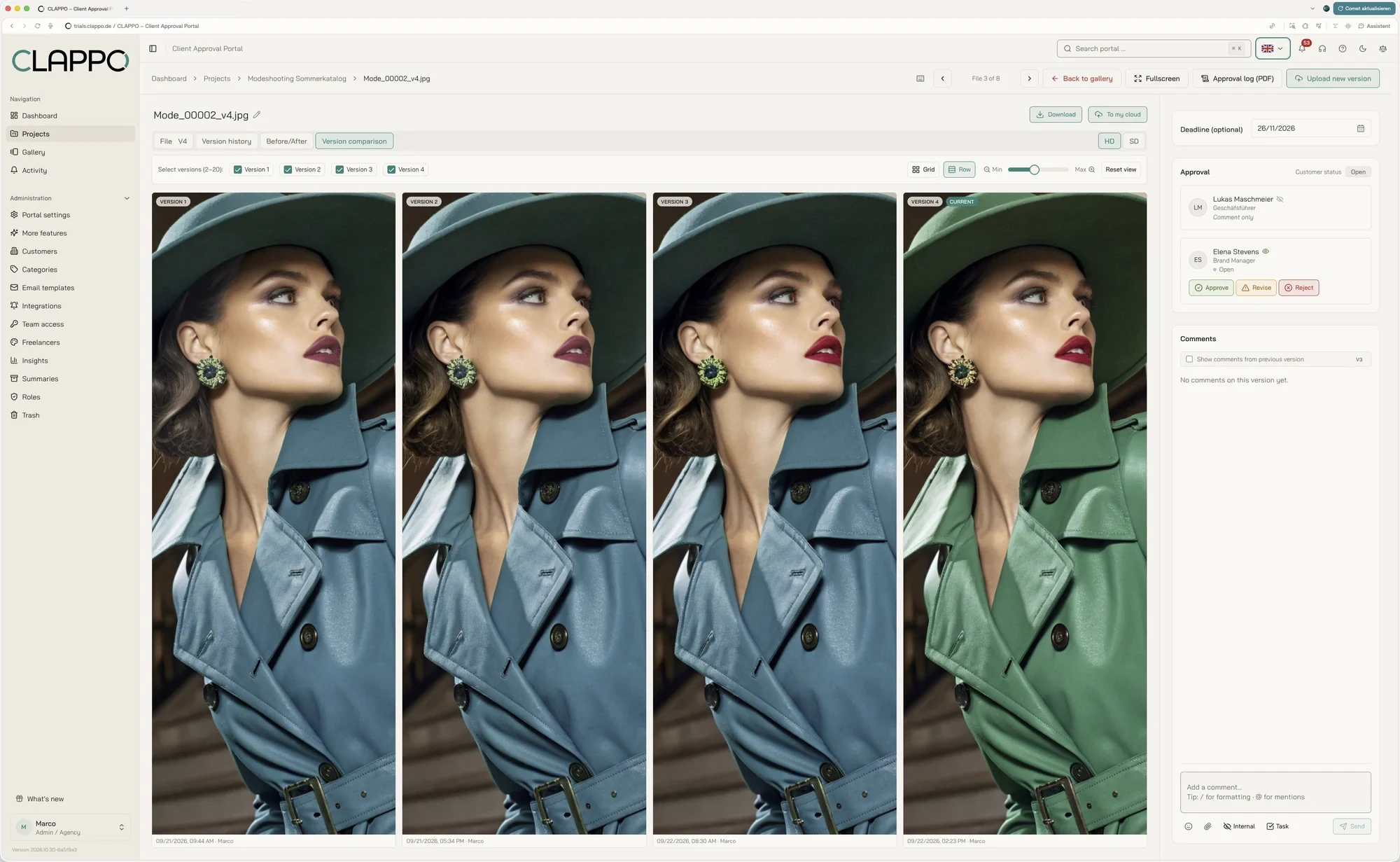
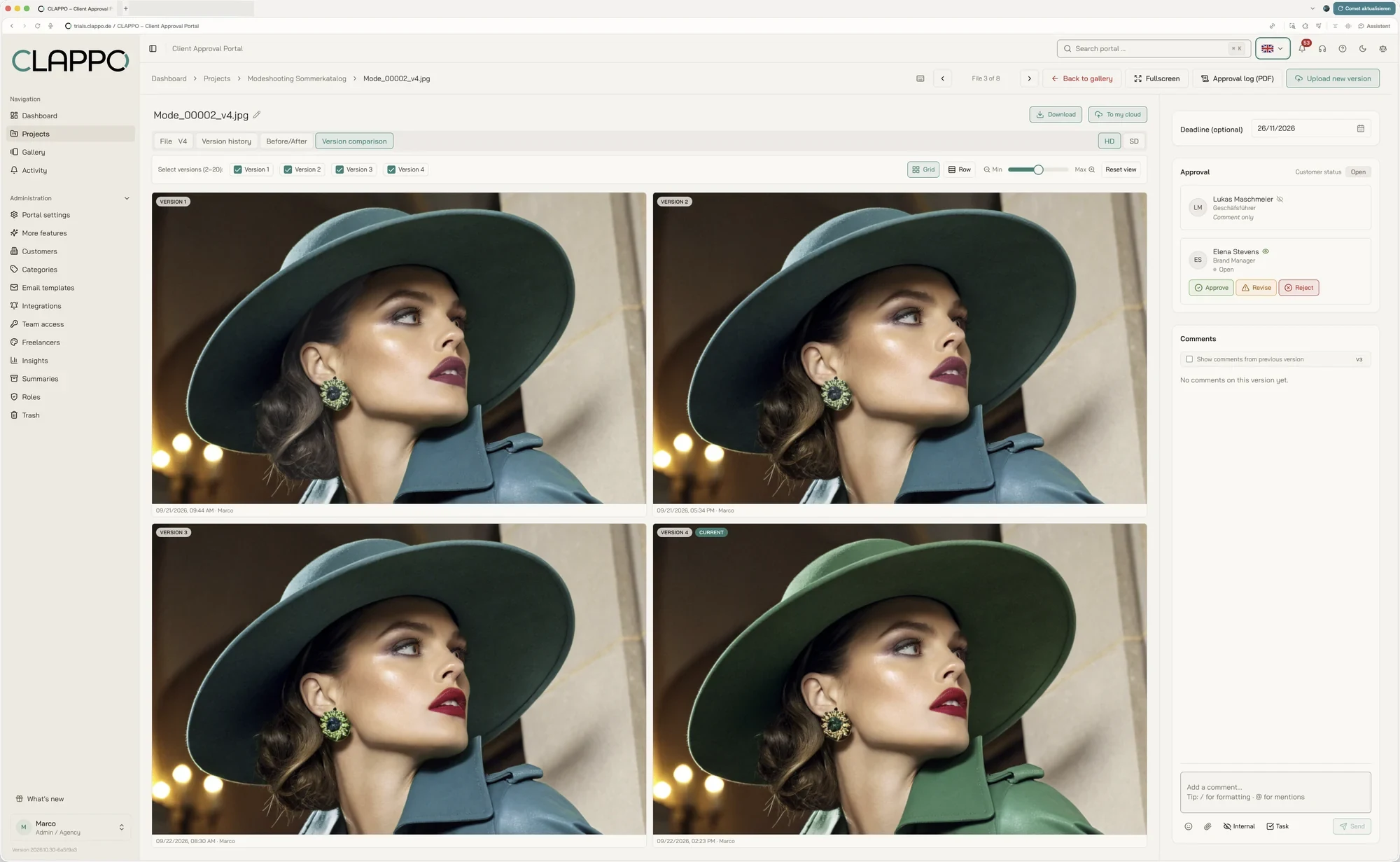
Version comparison as a grid or in a row – up to 20 versions at once.

Version comparison tab, row layout: four versions of a fashion photo side by side, version 4 marked as current
Hover over the image to switch the view

Row: the selected versions stand side by side in one row. Zoom and crop apply to all of them at once.

20Compare up to 20 versions at once
In synczoom and crop move together
1 clickto the next approval
08 / Office documents

Office documents.
Word, Excel & PowerPoint.

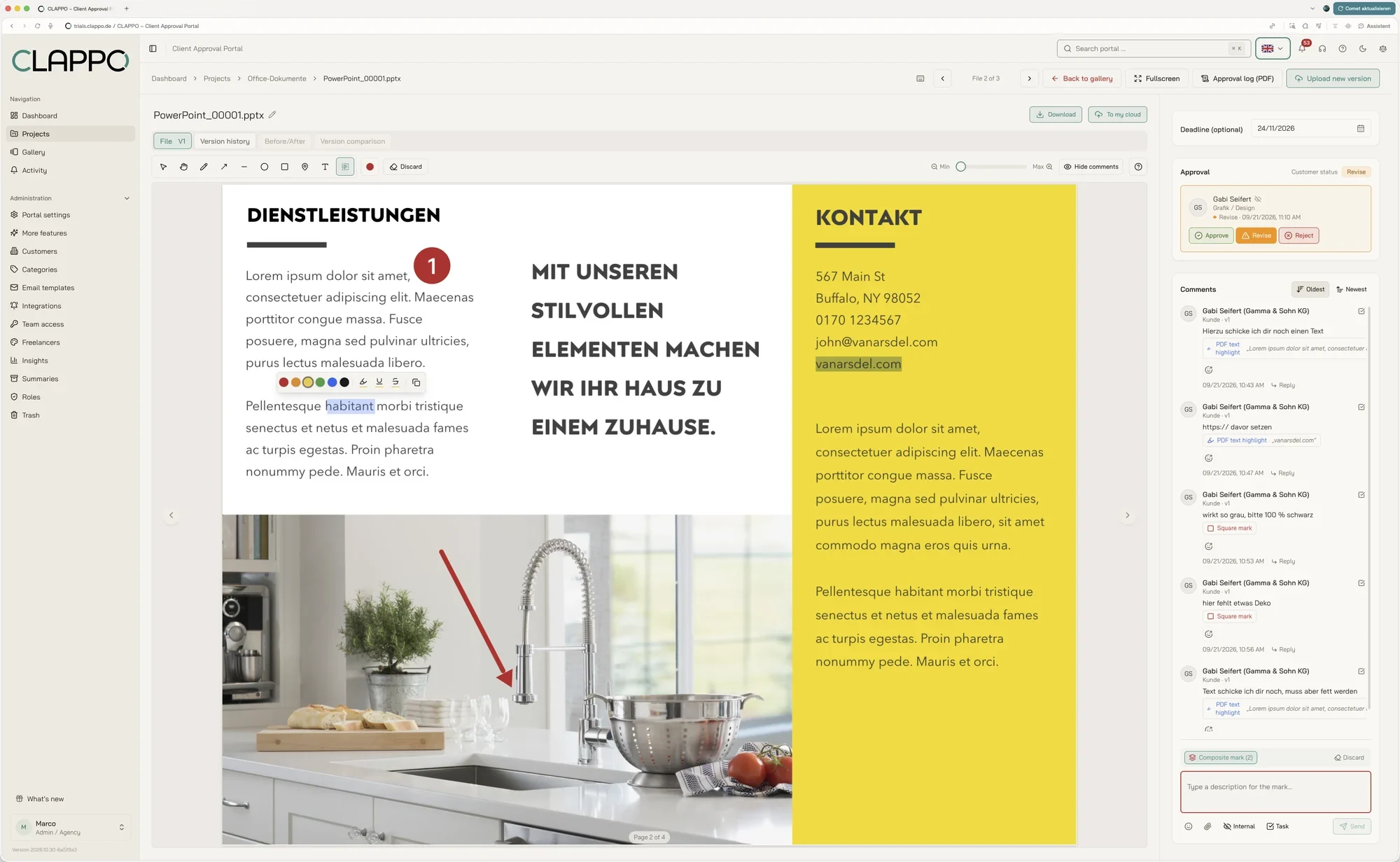
Upload Word, Excel and PowerPoint files directly and comment on them together in the portal. No download, no detour via email.

Excel spreadsheet in the portal with comments in the sidebar
09 / PDF review

Perfect for
PDF review.

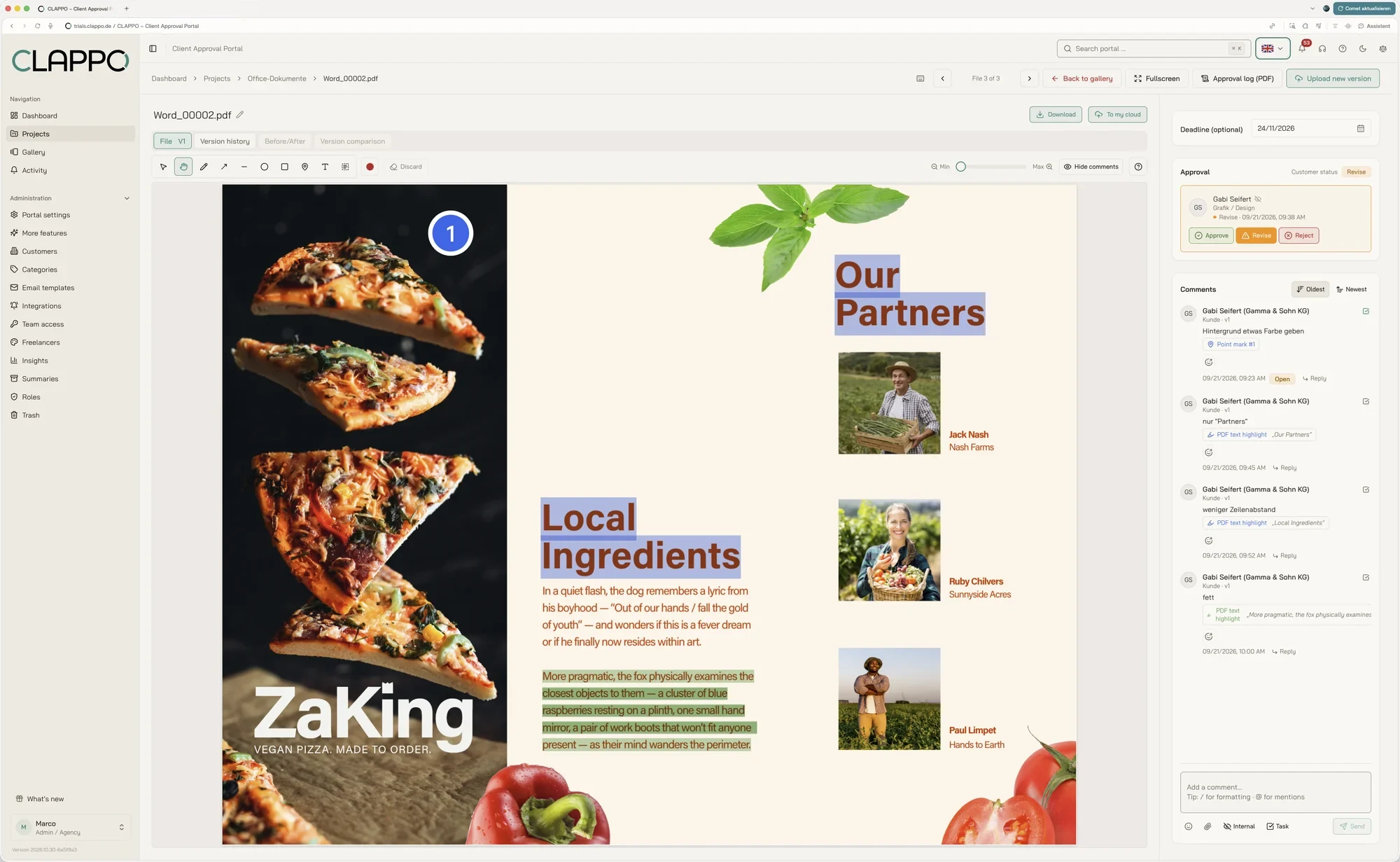
Highlight and comment on text – right in the document. Every note is linked to the exact passage.

Presentation with highlighted text passages and linked comments
10 / Client approval

Let clients approve.
No detours.

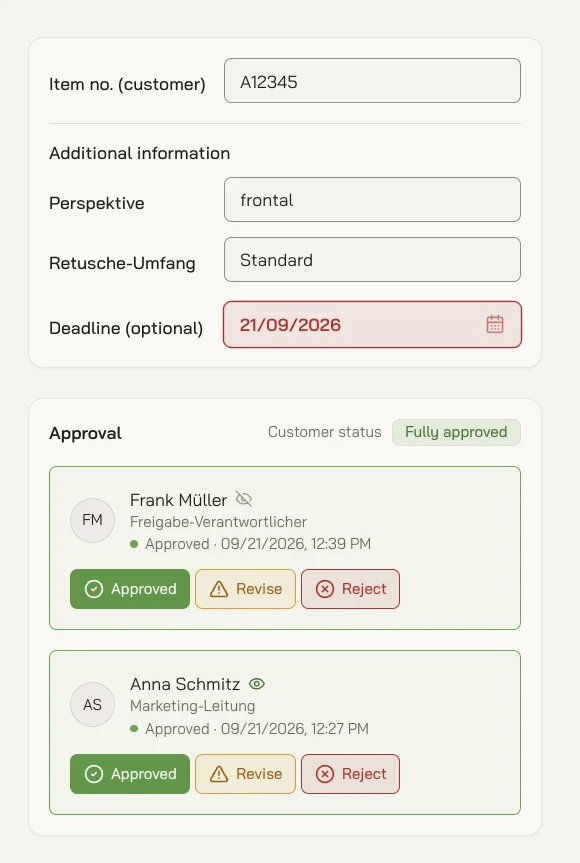
Your team prepares everything internally. Your clients get simple access, see exactly what needs approval – and decide with one click: approve, request changes or reject.

  • Multiple approvers per project
  • Status per person, with date and time
  • Deadlines and client details right on the file
Approval area with two approvers, both have approved
Testimonials

What clients say.
From real projects.

Voices from projects that are reviewed and approved with CLAPPO.

From the approver’s side
“Since we started coordinating our images with the new tool CLAPPO, project management has become even more efficient for me. The interface is intuitive and works for corrections both visually and in writing. I really like the colour-coded traffic-light system for approvals and corrections.”
Translated from German
Tamara ReuterPhotographer / Producer, The Berner Group
From the approver’s side
“Several people on our side can review and approve in parallel without anything getting lost. That has noticeably simplified our internal processes.”
Translated from German
Kristina BeckerHead of Marketing, Service & Distribution GmbH
From the approver’s side
“Our agency uses the portal with us to coordinate layouts and photos. In it we always see the current status of the work and can download the final files right there.”
Translated from German
Philipp MathiesManaging Director, MARO GmbH
11 / Overview

Everything in view.
At any time.

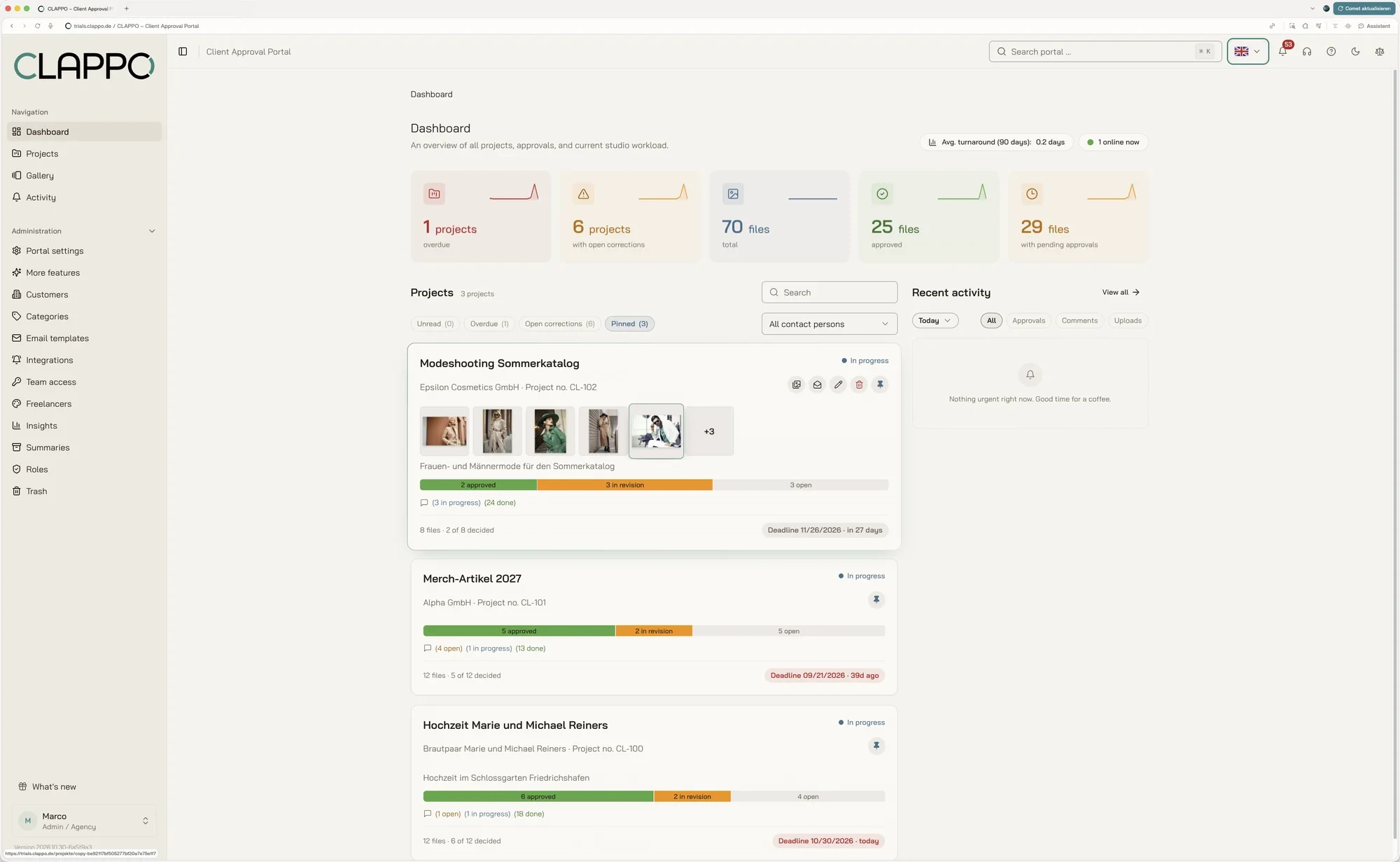
The dashboard shows open revisions, deadlines and activity at a glance.

CLAPPO dashboard with key figures (overdue projects, open corrections, files), pinned projects with progress and latest activity
ProgressApproval status per project
DeadlinesOverdue items visible right away
TasksOpen revisions in one place
ActivityWho did what and when
13 / Transparency

Every change
traceable.

From the first note to the final approval, the history stays clear and fully documented.

Today, 10:42 AMVersion 4 was uploadedProject · Summer catalog fashion shoot
Yesterday, 4:18 PMElena replied to 3 commentsFile · Mode_00002_v4.jpg
Sep 22, 9:12 AMClient approval grantedProject · Merch items 2027
Sep 21, 2:05 PMNew project createdBy · Marco
Page of a PDF project summary with approvals, versions and comments
14 / Project summary

In the end, you get more than an approval.
You get a traceable history.

One click creates a PDF project summary: every file with preview, approval status, all versions and the complete comment history. Ideal for filing, invoicing or handing over to the client.

PDF export with one click Approvals with name and date Saved snapshots stay available permanently
15 / Administration

Full control.
Without complicated processes.

CLAPPO grows with the way you work – from solo freelancer to complex client structures.

01Clients

Manage contacts and approvers centrally

02Team access & roles

Decide yourself what clients, approvers and freelancers may do

03Freelancers

Bring in externals – with briefing and reference files

04Email templates & branding

Communication in your look

New in October 2026

New in CLAPPO.
Just added.

What we have built over the last few weeks. All details are in the overview of all features.

Ready for the next step?

Approvals that
move you forward.

We show you CLAPPO in a personal live demo: online via Teams, in 30 to 45 minutes, free and without obligation.
On your own or together with your team.

Try it free, no strings attached
14 days.

No risk, no credit card. We set up your trial account personally.

You are not testing in an empty environment: your account comes with sample projects, images, comments and approvals, so you see right away how CLAPPO works day to day.

16 / Pricing

The right plan.
For every workflow.

Start with the plan that fits your team. All prices net plus VAT. Cancel monthly, or pay a year upfront and get 2 months free.

Black Friday

50% off for 24 months

on all CLAPPO plans, monthly or yearly

Code BF50

Enter at checkout, valid until 30 Nov 2026, 11:59 pm (CET)

Terms: 50% off the respective list price for the first 24 months of the subscription started with the code, also if you change plans. Code valid for new subscriptions from 18 to 30 Nov 2026, 11:59 pm (CET). Cannot be combined with the switching bonus or the partner extra month. After that, the regular list price applies. Offer for businesses, all prices net plus VAT.

Plan

Freelancer

€35net / month

Users1
Approvers10
Freelancers2
Storage25 GB
Video upload up to500 MB
  • Unlimited projects
  • All file formats
  • All annotation tools
  • Version comparison for images, PDFs and videos
  • Approval without a client account, via link
  • Deadlines and automatic reminders
  • Notifications in Slack and Microsoft Teams
  • Upload & download with Google Drive, OneDrive and Dropbox
  • PDF project summary
  • Custom branding
  • German email & phone support
  • Hosted in Germany, GDPR compliant

Cancel monthly

Plan

Start

€99net / month

Users10
Approvers100
Freelancers10
Storage100 GB
Video upload up to500 MB
  • Unlimited projects
  • All file formats
  • All annotation tools
  • Version comparison for images, PDFs and videos
  • Approval without a client account, via link
  • Deadlines and automatic reminders
  • Notifications in Slack and Microsoft Teams
  • Upload & download with Google Drive, OneDrive and Dropbox
  • PDF project summary
  • Custom branding
  • German email & phone support
  • Hosted in Germany, GDPR compliant

Cancel monthly

Plan

Studio

€279net / month

Usersunlimited
Approversunlimited
Freelancersunlimited
Storage1 TB+1 TB for €98/month each
Video upload up to2 GB
  • Unlimited projects
  • All file formats
  • All annotation tools
  • Version comparison for images, PDFs and videos
  • Approval without a client account, via link
  • Deadlines and automatic reminders
  • Notifications in Slack and Microsoft Teams
  • Upload & download with Google Drive, OneDrive and Dropbox
  • PDF project summary
  • Custom branding
  • German email & phone support
  • Hosted in Germany, GDPR compliant
  • Websites for approval
  • Videos up to 2 GB per file
  • Multi-stage approval (approval stages)
  • Webhooks for Zapier, Make and your own systems
  • Insights (turnaround times, correction rounds, CSV)

Cancel monthly

All details on plans, terms and payment